
Hands-on AI labs for testers · self-paced

A real cloud lab for every learner, built on demand

Testing Fantasy Cloud is for testers who need to learn how AI systems fail: build a RAG assistant in a real lab, then break it.

Opens in November 2026, as a beta. Planned price: from €29 a month, VAT included, with a 7-day free trial.

Press Begin quest and the platform builds a private machine with the real tools on it, guides you through the exercises beside it, records your progress, and destroys the machine when you close the lab. Nothing to install.

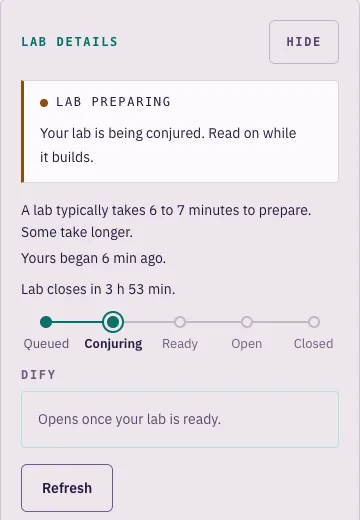
The exercise page with the lab panel: lab preparing, begun 6 minutes ago, the state track at Conjuring
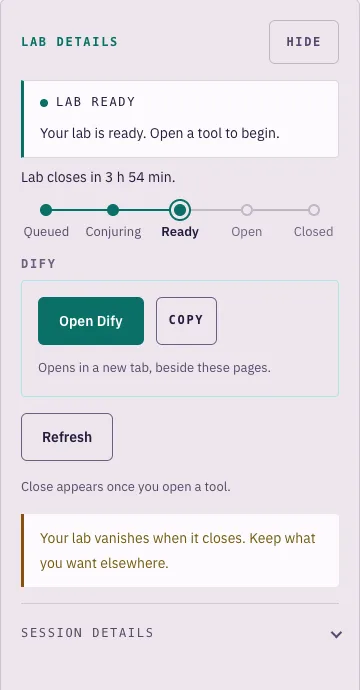
The first lesson with the lab panel: lab ready, an Open Dify button and the time left before the lab closes
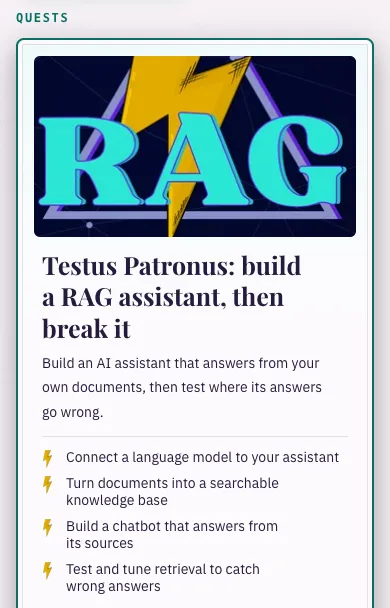
Quest artwork: Testus Patronus, a lightning bolt over the letters RAG

Real screen · the lab panel beside the lesson

  • 1private machine per lab
  • 4 vCPU · 8 GiBfor each learner
  • 16services in the Dify 1.16.1 stack
  • 4 hper lab

See it work

One quest, from the quest board to a working assistant

Real screens of the product, following a learner through the first quest.

  1. The quest board with the Testus Patronus quest card: four outcomes and 2 h 30 min
    01 / 05Pick a questThe quest board shows what you will build and how long it takes. Testus Patronus: build a RAG assistant, then break it. 2 h 30 min.
  2. The exercise page with the lab panel: lab preparing, begun 6 minutes ago, the state track at Conjuring
    02 / 05The platform builds your labA machine starts for you alone. The lab panel says what is happening and how long it has been, while you read the lesson beside it.
  3. The lab panel beside the first lesson: lab ready, an Open Dify button, and a note that the lab vanishes when it closes
    03 / 05Lab ready: open the toolOne button opens the real tool in a new tab.
  4. Dify Studio inside the lab: a chatflow of four nodes, User input, Knowledge retrieval, LLM and Answer
    04 / 05Build the assistant in the real toolInside the lab, in Dify itself: a chatflow of four nodes, from the user’s question through knowledge retrieval and the model to the answer. Not a simulation.
  5. The published chatbot explaining Jira issue REST-259, with citations to four issues
    05 / 05Ask it a questionThe published assistant explains a Jira issue from the knowledge base and lists the four issues it used.

Real screens · the learner app and the tool inside a lab

The lab

What happens when you press Begin quest

No shared server and no simulator. Each lab is a real machine in the EU (Ireland), started for one learner and reachable only by that learner.

How one lab is provisioned The learner app asks the session API for a lab. The request is queued. A provisioner starts one EC2 machine for the session, which runs the tutorial stack and reports four stages back. A broker behind a shared load balancer opens the lab only to its owner. A model gateway issues a personal key with a one euro limit. Closing the lab or the four-hour limit terminates the machine. Learner Control plane (serverless) One lab = one machine Learner appserved from a CDN Sign-inAmazon Cognito Session APIOpenAPI contract session table · audit table Queue+ dead-letter queue Provisionerlaunch template EC2 instance4 vCPU · 8 GiB · one per learner Tutorial stack (Compose)Dify 1.16.1 · 16 services 1 starting your machine2 starting the tools3 preparing the data4 checking everything answers Shared load balancerwildcard certificate Brokerowner checked on every request https://<32-character label>.session… Clean-upsweeper + the machine’s own timer close or 4-hour limit → terminate stage reports 1 2 3 4 5

  1. Request. The learner app asks the session API for a lab. The request is recorded and queued.
  2. Build. A provisioner starts one virtual machine for this session (4 vCPU, 8 GiB) from a launch template and a checksummed tutorial package.
  3. Report. The machine starts the tutorial's stack, here a 16-service Dify 1.16.1 installation, and reports four stages back. The learner sees them live.
  4. Open. A broker gives the lab its own random 32-character address behind a shared load balancer and checks on every request that the person opening it owns it.
  5. Remove. Closing the lab, or reaching the four-hour limit, terminates the machine. A sweeper and the machine's own timer catch anything left behind.
  1. Request

    Learner appSession APIQueue

    The learner app asks the session API for a lab. The request is recorded and queued.

  2. Build

    EC2 instance · 4 vCPU · 8 GiB

    one per learner, from a launch template

    A provisioner starts one virtual machine for this session (4 vCPU, 8 GiB) from a launch template and a checksummed tutorial package.

  3. Report

    Tutorial stack (Compose)

    Dify 1.16.1 · 16 services

    1. Starting your machine
    2. Starting the tools
    3. Preparing the data
    4. Checking everything answers

    The machine starts the tutorial's stack, here a 16-service Dify 1.16.1 installation, and reports four stages back. The learner sees them live.

  4. Open

    Shared load balancerBrokerOwner check

    A broker gives the lab its own random 32-character address behind a shared load balancer and checks on every request that the person opening it owns it.

  5. Remove

    TerminateSweeperMachine timer

    Closing the lab, or reaching the four-hour limit, terminates the machine. A sweeper and the machine's own timer catch anything left behind.

REQUESTEDASSIGNEDPROVISIONINGREADYACTIVERELEASINGRELEASED

In the learner's words: Queued · Conjuring · Ready · Open · Closed

The four stages a learner sees while the lab builds

  1. Step 1 of 4Starting your machine
  2. Step 2 of 4Starting the tools
  3. Step 3 of 4Preparing the data
  4. Step 4 of 4Checking everything answers
  5. ThenLab ready
  • 4 hmaximum per lab
  • 15 minwarning before the end
  • 30 minunused and never opened: released
  • 1lab open per tutorial at a time

Under the hood: the full architecture

The platform

Four things the platform does for you

  • Labs on demand

    A machine of your own for every lab, built in minutes and removed when you finish.

    How a lab is built
  • Progress and badges

    One honest progress figure per quest and two badges. Kept between labs.

    Your quest board
  • Subscriptions at opening

    One plan, monthly or yearly, with a 7-day trial. Payment and self-service changes will go through Stripe at opening.

    Pricing

How it works

From sign-up to a running lab in four steps

  1. 01

    Pick a quest

    Every tutorial is a quest with a plain outcome. Opening with Testus Patronus: build a RAG assistant, then break it. About 2 h 30 min.

    The quest card for Testus Patronus: four outcomes, 2 h 30 min, lab ready
  2. 02

    Press Begin quest

    The platform starts a machine for you alone, and the lab panel follows it from Queued to Ready and says how long it has been. It takes about 5 to 7 minutes. Read the first lesson while it builds.

    The lab panel: lab preparing, the state track at Conjuring
  3. 03

    Work beside the lesson

    Lessons and exercises on one side, your lab one click away.

    The lab panel: lab ready, an Open Dify button, and a note that the lab vanishes when it closes
  4. 04

    Close the lab, keep the progress

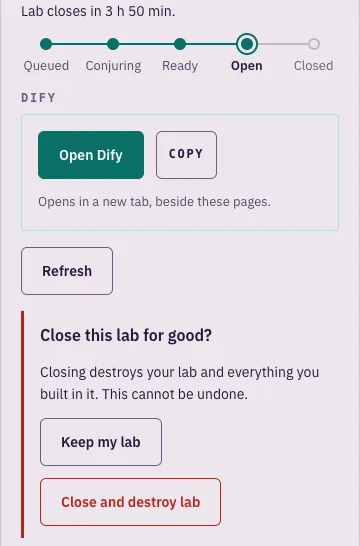
    A lab runs for up to four hours and you get a warning 15 minutes before it ends. Closing it destroys the machine. Your progress and badges stay.

    The close confirmation: Close this lab for good, with Keep my lab and Close and destroy lab buttons

Get early access

Progress

A quest board that only shows what you have done

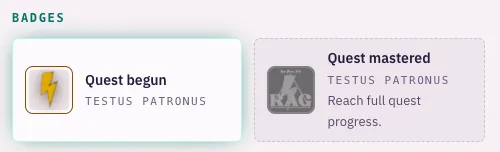
Every quest has one progress figure and its badges, starting with Quest begun when you first enter. The platform keeps them, so they survive every lab you close. No points, no streaks, no numbers we made up.

The badges row of the quest board: Quest begun earned, Quest mastered still locked
Real screen · the badges on the quest board

Why it is different

Not a video course. Not an empty sandbox.

Not a video course. Not an empty sandbox.
Video-course platformsGeneric cloud sandboxesTesting Fantasy Cloud
What you practise onUsually a recording, sometimes a quizA blank machine or consoleThe real tool, installed and configured for the exercise
Set-upYour own laptop and accountsYou build the stack yourselfNone. Built for you in minutes
GuidanceVideo, away from the toolUsually noneThe lesson sits beside the lab, exercise by exercise
Cost controlNot applicableYour card, your riskTime and spend limits are part of the platform
ProgressVideos watchedNoneA stored figure and badges per quest

Testing Fantasy Cloud

What you practise on
The real tool, installed and configured for the exercise
Set-up
None. Built for you in minutes
Guidance
The lesson sits beside the lab, exercise by exercise
Cost control
Time and spend limits are part of the platform
Progress
A stored figure and badges per quest

Video-course platforms

What you practise on
Usually a recording, sometimes a quiz
Set-up
Your own laptop and accounts
Guidance
Video, away from the tool
Cost control
Not applicable
Progress
Videos watched

Generic cloud sandboxes

What you practise on
A blank machine or console
Set-up
You build the stack yourself
Guidance
Usually none
Cost control
Your card, your risk
Progress
None

Behind the scenes

Operated from a console, not from a spreadsheet

The platform has a second application for the people who run it: today's labs at a glance, conference rooms with seat codes, the tutorial catalog and cost against a monthly ceiling. It is designed with a second sign-in factor for operators and a record of every operator action.

Under the hood

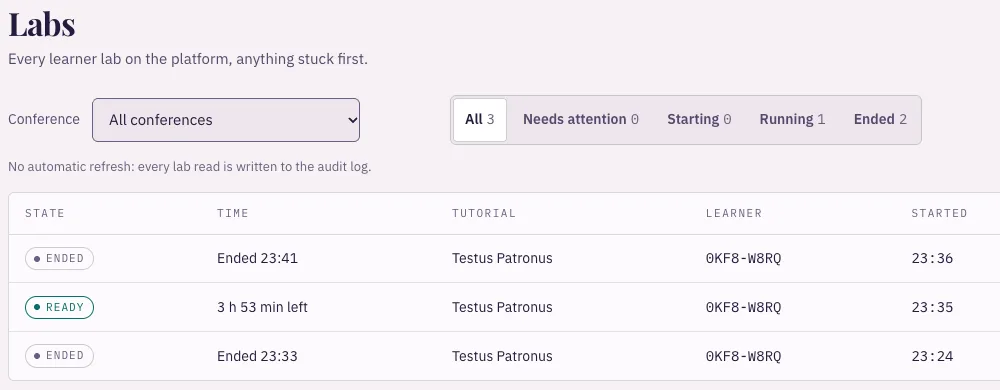
The operator backstage Labs view: every lab with its state, time left, tutorial and the learner’s pseudonym
Real screen · backstage during a test run: one learner, three labs
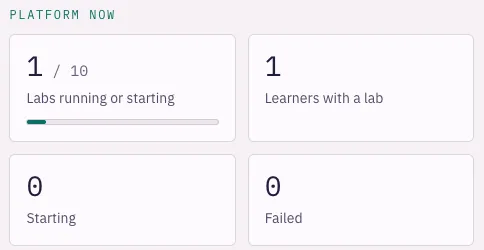
The operator backstage, Platform now: labs running or starting, learners with a lab, starting, failed
Real screen · backstage during a test run, Platform now

Where it comes from

The classroom it grew from ran at three conferences

Per-attendee cloud environments were run for hands-on tutorials at three conferences, on the earlier generation of the classroom. Testing Fantasy Cloud is its successor and has not itself run at a conference.

Where the environments ran

Earlier generation of the classroom

Best Tutorial Award AutomationSTAR 2025

How delegates rated the tutorials

Each figure is that session’s own score, as the conference organisers reported it from delegates’ ratings. No ranking is claimed.
ConferenceScoreRatingsPer-attendee cloud environments
AutomationSTAR 2025Amsterdam · Best Tutorial Award4.70 / 533Yes
EuroSTAR 2025Edinburgh9.00 / 1036Yes
AutomationSTAR 2024Vienna4.71 / 515No, a different playground
EuroSTAR 2026Oslo8.24 / 1041Yes

About the lab environment

“Last year in Edinburgh, Paula’s tutorial was one of the first to sell out and was highly rated by attendees.”

From the organiser EuroSTAR Conference blog

About the tutorials

  • “And my absolute highlight? The tutorial Testus Patronus: No Magic, Just AI with Your Company Context by Paula Bassagañas Òdena. Building a custom chatbot connected to our own JIRA data was both fun and practical.”

    Jana ZientkováSenior Test Consultant

  • “I want to add a special thank you to Paula Bassagañas Òdena for a great and so well prepared tutorial on building our own RAG.”

    Oleksandra KalmykovaStaff Software Engineer, Test, FDJ United

  • “The session was fantastic! The presentation was top-notch, clearly structured, and engaging. The hands-on portion was incredibly well-prepared, allowing us to apply what we learned effectively. Overall, it was a valuable learning experience.”

    Conference delegateAutomationSTAR 2024

  • “We really liked it. Combination of theory and hands on exercises. Very good presentation skills.”

    People Lead, Software DevelopmentDefence technology company

  • “Attending a tutorial by Paula Bassagañas Òdena is a no-regret move! Her knowledge combined with her enthusiasm and storytelling capabilities makes every tutorial a true joy filled with practical learnings you can start applying immediately!”

    Sonja NešićStaff Engineer, bol

  • “Amazing tutorial! Really great explanations and the hands-on was so well prepared and useful”

    Conference delegateAutomationSTAR 2024

  • “Very profesional, hands on session covering all the key points and really good guidance and content”

    Conference delegateAutomationSTAR 2024

  • “Paula gave us a lot of useful and structured information. A real take away workshop”

    Conference delegateEuroSTAR 2026

Where it stands

What is built, and what is next

Taken from the platform repository’s own roadmap, in plain words.

Built

  • Tutorial packagesA tutorial is a checksummed package the platform compiles and runs. The first one, Testus Patronus, is accepted.
  • A lab per learnerSession API, queue, provisioner, broker and clean-up: one machine per lab, opened only to its owner.
  • Learner app and backstageThe quest board, the tutorial page with its lab panel, and the operator console.

In progress

  • Self-service betaA development environment is deployed. The production one is being prepared for the opening.
  • SubscriptionsPlans, checkout and the customer portal are written against Stripe. The hosted wiring and the learner billing screens come next.
  • Metered model accessThe per-lab key, its limit and the allowance shown on the lab panel work on the local stack with a real model. The hosted gateway is being wired.

Next

  • A second tutorialThe next package moves an existing conference tutorial onto the platform.
  • Operator control planeMore of the day-to-day operation moves into the backstage.
  • HardeningNetwork isolation, richer progress and commerce features.

Testing Fantasy is a one-person product company in Biberach an der Riß, Germany, founded by Paula Bassagañas, IT architect. Testing Fantasy Cloud is its product. Talk to the founder

Pricing

One plan. Everything included. Opens Nov 2026

Every tutorial, a private lab each time and your progress. Prices include VAT.

First 100 subscribers

Founding price

€250/ year

€20.83 a month, €98 less than paying monthly. VAT included.

€29/ month

Billed monthly. VAT included.

You keep this price for as long as you stay subscribed.

Get early access

Opens in November 2026, as a beta. No card is asked for before then.

After the first 100

Standard price

€400/ year

€33.33 a month, €188 less than paying monthly. VAT included.

€49/ month

Billed monthly. VAT included.

The price once the 100 founding places are taken.

All four prices, VAT included
MonthlyYearly
Founding price, first 100 subscribers€29€250
Standard price€49€400

The founding price is for the first 100 subscribers. We do not show a live count here. At opening, after you sign in and before you enter a card, you will be shown the price you will pay. If the founding places are gone you will see the standard price and can stop there.

Included

  • Every tutorial in the catalog. One tutorial at opening
  • A private lab each time you start a quest
  • Progress and badges kept between labs
  • At opening: change or cancel yourself in Stripe's portal

One lab open per tutorial at a time · up to 4 hours per lab

At opening: three steps to your first lab

  1. 01

    Create your account with your email.

  2. 02

    Start the trial on Stripe's checkout page; your card is not charged for 7 days.

  3. 03

    Begin your first quest.

Get early access

FAQ

Questions, answered plainly

Who is it for?

Software testers and quality engineers who need to learn how AI systems fail. In the first tutorial, Testus Patronus, you build a RAG assistant in the real tool and then test where its answers go wrong. It is self-paced and you need only a browser.

What do I get with a subscription?

Every tutorial in the catalog, a private lab each time you start one, and your progress and badges. One tutorial is available at opening, Testus Patronus: build a RAG assistant, then break it.

How does the free trial work?

From the opening, the first 7 days will be free. You will enter a card when you start, and nothing will be charged until the trial ends. Cancel before then and you pay nothing. One trial per account.

What is the founding price?

The first 100 subscribers will pay €29 a month or €250 a year instead of €49 or €400, and keep that price for as long as they stay subscribed. The price you will pay will be shown after you sign in, before you enter a card.

Do the prices include VAT?

Yes. The price you see is the price you will pay.

How will I pay?

At opening: by card, Apple Pay or Google Pay, on Stripe's checkout page. Testing Fantasy will never see or store your card details. No payment is taken before the opening.

How will I cancel or change my plan?

At opening, "Manage subscription" will open Stripe's customer portal, where you will be able to cancel, switch between monthly and yearly, update your card and download invoices. If you cancel, you keep access until the end of the period you have paid for.

What happens if a payment fails?

Stripe will retry it and you will be able to update your card in the portal. The platform is designed so that a lab already running is not shut down because of a payment problem.

What exactly is a lab?

A virtual machine started for you alone, with 4 vCPU and 8 GiB of memory, running the tutorial's real software. For Testus Patronus that is a complete Dify 1.16.1 installation. It runs in the EU (Ireland).

How long does a lab take to start, and how long does it last?

It takes about 5 to 7 minutes to build, and you can read the first lesson meanwhile. A lab runs for up to four hours, with a warning 15 minutes before the end. When it closes the machine is destroyed, so keep anything you want elsewhere. Your progress stays.

Do I need my own OpenAI or Azure key?

Until the hosted model gateway is live, a lab needs a model key of your own. A key for each lab with a spending limit already works on our local stack with a real model, and the hosted gateway is being wired.

Do I need to install anything?

No. You need a browser. A laptop or desktop is the comfortable way to work in the lab.

Is this the same as the live workshops?

No. The workshops are live sessions for teams, booked on testingfantasy.com. Testing Fantasy Cloud is self-paced and you subscribe on your own.

Can I delete my account?

Yes. Write to us and we delete it.

Contact us

Can my company pay for several people?

Team plans are not available yet. Write to us and we will tell you when they are.

Contact us

Get early access

Leave your email address and we write to you when the platform opens.

Get early access

Opens in November 2026, as a beta. Planned price: from €29 a month, VAT included.